Student-produced responses in Bluebook
About a quarter of the math questions ask you to type your own answer, with no choices to lean on. A correct answer entered in the wrong form scores zero, so the form is worth knowing cold.
Roughly one in four math questions is a grid-in, where, instead of choosing an answer, you compute it and type it into a box. The exact placement of these questions within a module is controlled by Bluebook, and they remove your safety nets: there are no choices to back-solve from, and no choices to catch a mistake. That makes two things matter more than usual. First, your arithmetic must stand on its own. Second, and this is the subject of this lesson, your answer must be entered in a form the machine accepts, because a perfectly correct value typed the wrong way is marked wrong all the same. The rules are few and entirely learnable; learn them now so that on test day the entry is automatic.
Allowed forms for student-produced responses
The box accepts integers, decimals, and fractions, and, on the digital test, negative answers too, which the older paper version did not allow. A positive answer can use up to five characters; a negative answer up to six, because the minus sign takes one of them. Within those limits you have real freedom: equivalent forms are all accepted, so a value of one-half can go in as 1/2 or as 0.5, and a fraction need not be reduced: 4/8 is graded the same as 1/2. The grid only cares that the value is correct and the form is legal.
Enter fractions; convert mixed numbers before entry
Fractions go in with a slash, numerator then denominator, and as noted they need not be in lowest terms. The one firm rule is about mixed numbers: never enter them. The machine reads a space or the digits of “3 1/2” as the single fraction thirty-one halves, not three-and-a-half, so a mixed number must be converted, to the improper fraction 7/2 or the decimal 3.5, before it goes in the box. And if a fraction is simply too long to fit the available characters, convert it to a decimal instead.
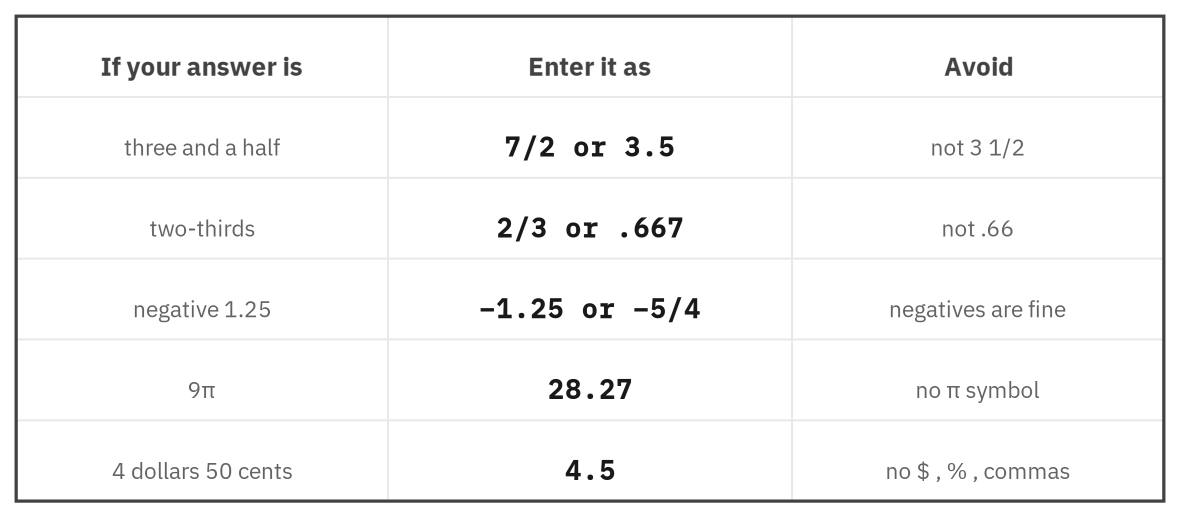
Figure 1. How common answers should be entered. Convert mixed numbers, drop all symbols, and use a decimal when a fraction will not fit.
Enter decimals within Bluebook precision limits
Decimals carry the subtlest rule, and it is worth getting exactly right. If your decimal fits the box, enter it exactly, and do not round unless the question explicitly asks you to, since needless rounding can turn a right answer wrong. If a decimal is long or repeating and will not fit, you must fill the whole field, then truncate or round at the last available place. The catch is that a shorter, less accurate value is rejected: for two-thirds you may enter .6667 or the rounded .667, but .66 and .67 are not accepted, because they throw away accuracy the field had room for. When in doubt, a fraction sidesteps the issue entirely; 2/3 is always exact.
Avoid unsupported SPR formats and symbols
The grid takes numbers only. No symbols, units, or separators belong in it: no percent sign, no dollar sign, no comma in a large number, no degree mark, and no π or square-root symbol. If a value is a percentage, enter just the number the question wants; if it is an amount of money, enter the figure without the dollar sign; if it is 60,000, enter 60000 with no comma. And because π cannot be typed, a numeric SPR answer involving it is entered as a decimal: entered using the field's full available precision, for example 28.27, which is why the book's practice problems asking for a π-based answer often ask for the coefficient (a plain number, gridded directly) rather than the full decimal value. When a decimal is required, the usual truncate-or-round rule for a non-terminating value still applies: any entry accurate to the full width of the field is accepted. Finally, if a question has more than one correct answer, enter only one of them.
Student-produced response rules
Allowed: integers, decimals, fractions, and negatives, up to 5 characters (6 with a minus sign).
Fractions: slash form, need not be reduced; convert to a decimal if too long.
Never enter a mixed number; convert to an improper fraction or a decimal.
Decimals: enter exactly if they fit; if not, fill the whole field. A less accurate short value is rejected.
Don't round unless the question asks; don't enter a percent sign, a dollar sign, commas, units, π, or roots.
One answer only when several are correct.
Confirm the requested quantity before entering an SPR
Because nothing on the screen will flag a slip, the final habit is deliberate care at the moment of entry. Re-read what the question actually asked (its value of , or the area, or the percent) and confirm the number in the box is that quantity, not an intermediate result you computed along the way. Then check the form: legal characters, no stray symbol, the decimal point present if it belongs. This ten-second review is the cheapest points on the test, because it rescues answers your mathematics already earned.
Verify value, sign, and format before submitting an SPR
In the practice set, decide for each item how the value should be entered into the grid.
Student-produced responses: summary
Grid-ins take a typed numerical answer with no choices to check against, so both your arithmetic and your entry must be right. Integers, decimals, fractions, and negatives are allowed within five characters (six with a minus sign); fractions need not be reduced and must never be entered as mixed numbers; decimals go in exactly when they fit and otherwise fill the whole field, with no rounding unless asked; and no symbol, unit, comma, or π ever belongs in the box. Above all, enter the quantity the question asked for, in a legal form, and give it a last glance, the surest way to keep the points your work has already won.